NanoSSH client overview
5 minute read
NanoSSH Client is used to securely connect to remote servers, which may be running NanoSSH Server or any other SSH server.
Typical uses for NanoSSH client
- SSH client shell: Provides a secured communication channel between two networked devices; typically used to log into a remote machine and execute commands. See Use Client for Shell (Remote) Access.
- SSH client SFTP: Enables secure retrieval (GET) and writing (PUT) of files from/to a remote machine; for example, to retrieve an updated image file from a server and to write a log file to the server. See Use Client for Secure File Transfer.
- SSH client port forwarding: Encrypts and decrypts TCP/IP traffic; often used so that proprietary applications operating on distributed machines can securely communicate. See Use Client for Port Forwarding.
Features
- Small memory footprint
- Speeds integration and testing of complex cryptographic functions for your product
- SSHv2 compliant
- TCP/IP-neutral
- Certificate support, per IETF draft 3, http://tools.ietf.org/html/draft-ietf-secsh-x509-03
- Re-keying at will, based on a specified number of packets or a certain amount of time
- Support for TPM-generated keys
- OS- and platform-agnostic for easy portability
- Threadless architecture, synchronous and asynchronous
- Guaranteed GPL-free code that protects your intellectual property
RFC Support
- SSH File Transfer Protocol, v2, v3 and v4
- RFC 4250: The Secure Shell (SSH) Protocol Assigned Numbers
- RFC 4251: The Secure Shell (SSH) Protocol Architecture
- RFC 4252: The Secure Shell (SSH) Authentication Protocol
- RFC 4253: The Secure Shell (SSH) Transport Layer Protocol
- RFC 4254: The Secure Shell (SSH) Connection Protocol (partially supported)
- RFC 4344: The Secure Shell (SSH) Transport Layer Encryption Modes
- RFC 4335: The Secure Shell (SSH) Session Channel Break Extension
- RFC 4419: Diffie-Hellman Group Exchange for the Secure Shell (SSH) Transport Layer Protocol
- RFC 4432: RSA Key Exchange for the Secure Shell (SSH) Transport Layer Protocol. For detailed information refer to section 7 of the RFC draft-ietf-secsh-filexfer-03.txt, SSH File Transfer Protocol (http://tools.ietf.org/html/draft-ietf-secsh-filexfer-03).
- RFC 6187: X.509v3 Certificates for Secure Shell Authentication
- RFC 6239: Suite B cryptographic suites for SSH
- Draft-green-secsh-ecc-07: Elliptic-Curve Algorithm Integration in the Secure Shell Transport Layer
- Draft-igoe-secsh-aes-gcm-02: AES Galois Counter Mode for the Secure Shell Transport Layer Protocol
- Draft-josefsson-ssh-chacha20-poly1305-openssh-00 - ChaCha20 Poly1305 for the Secure Shell Transport Layer Protocol
- Draft-ietf-curdle-ssh-ed25519-02 - Ed25519 for Secure Shell Transport Layer Protocol
Code architecture
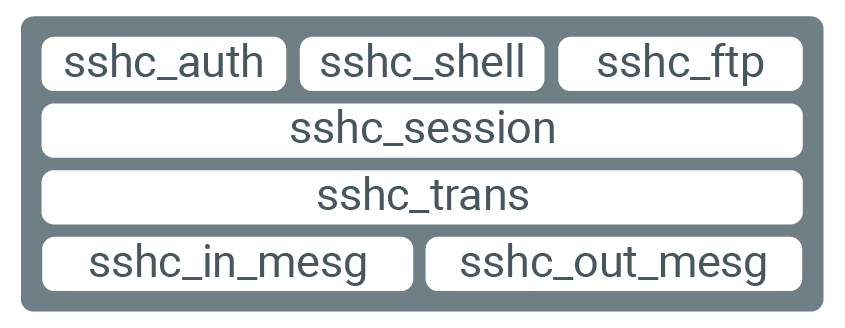
The following diagram displays how NanoSSH Client code uses a layered code hierarchy.
APIs
TrustCore SDK NanoSSH Client is implemented by the following ANSI C APIs:
- Common code base: Functions common to all TrustCore SDK components; defined in src/common/mocana.h.
- SSH client: Functions to implement synchronous communication between a NanoSSH Client and an SSH server; defined in src/ssh/client/sshc.h.
- SSH SFTP client: Functions to implement NanoSSH SFTP Clients; defined in src/ssh/client/sshc.h.
Build NanoSSH client example code
To assist with the integration of a NanoSSH client into devices, a suite of example code is included in the source distribution in the src/examples directory that corresponds to the following typical use caÏses:
- SSH client shell: Using the
sshc_shell_example.cfile, and follow the procedures in Use client for Shell (Remote) Access. - SFTP client: Using the
sshc_example.cfile, and follow the procedures in Use client for Secure File Transfer. - SSH client port forwarding: Using the
sshc_pf_example.cfile, and follow the procedures in Use client for Port Forwarding. - SSH client reverse port forwarding: Using the
sshc_rpf_example.cfile, and follow the procedures in Use client for Port Forwarding.
Sample code has also been provided to quickly build a NanoSSH client to demonstrate its features using example cmake project and build scripts.
The example code should be used “as-is” to validate SSH client-server communication. After verifying that the TrustCore SDK code works as expected on a system (see Use case examples), the example code may be customized or used as a model for other implementations; see Customize a client Implementation.
Generate NanoSSH client quick build
./scripts/nanossh/ssh_client/build_ssh_client_ncrypto.sh <arguments>

Run the following command:
cmake -DBUILD_SAMPLES=ON <options> -B build -S .
cd build
make
Run the following commands from the root of the repository:Command examples
- Without certificates
./scripts/nanossh/ssh_client/build_ssh_client_ncrypto.sh - With server certificate
./scripts/nanossh/ssh_client/build_ssh_client_ncrypto.sh --cert --server_cert_auth - With server certificate and OCSP stapling
./scripts/nanossh/ssh_client/build_ssh_client_ncrypto.sh --cert_ocsp - With server certificate and client certificate
./scripts/nanossh/ssh_client/build_ssh_client_ncrypto.sh --cert --server_cert_auth --client_cert_auth - With server certificate, client certificate, and OCSP stapling
./scripts/nanossh/ssh_client/build_ssh_client_ncrypto.sh --cert --server_cert_auth --client_cert_auth --cert_ocsp - With EC key support (Suite B)
./scripts/nanossh/ssh_client/build_ssh_client_ncrypto.sh --suiteb
Run NanoSSH client quick build
Run the following command:
./bin/ssh_client <options>
Options
?:Displays the help.-ip <ipaddr>: Sets the remote IP address.-username <username>: Sets the username for the remote host.-password <password>: Sets the password for the remote host.-port <port>: Sets the port number for the remote host.-ssh_ca_cert <ca_cert>: Sets the CA certificate path (used for authenticating cert provided by the server).-ssh_client_cert <cert>: Sets the certificate path (used by client to authenticate itself).-ssh_client_blob <key>: Sets the corresponding private key BLOB file path.
When using a certificate and key, ensure the corresponding cipher algorithms are enabled.
Command examples
- Without certificates
./ssh_client -port <port no> -ip <server IP address> - With server certificate
./ssh_client -port <port no> -ip <server IP address> -ssh_ca_cert <CAcert in .der/.pem format> - With server certificate and OCSP stapling
./ssh_client --port <port no> -ip <server IP address> -ssh_ca_cert <CAcert in .der/.pem format> - With server certificate and client certificate
./ssh_client -port <port no> -ip <server IP address> -ssh_client_cert <certificate in .der/.pem format> -ssh_client_blob <keyblob in .der/.pem/.dat format -ssh_ca_cert <CAcert in .der/.pem format> - With EC key support (Suite B)
./ssh_client_sb -port <port no> -ip <server IP address>
Was this page helpful?
Provide feedback